 Jakub Krehel · @jakubkrehel ↗
 Make Interfaces Feel Better
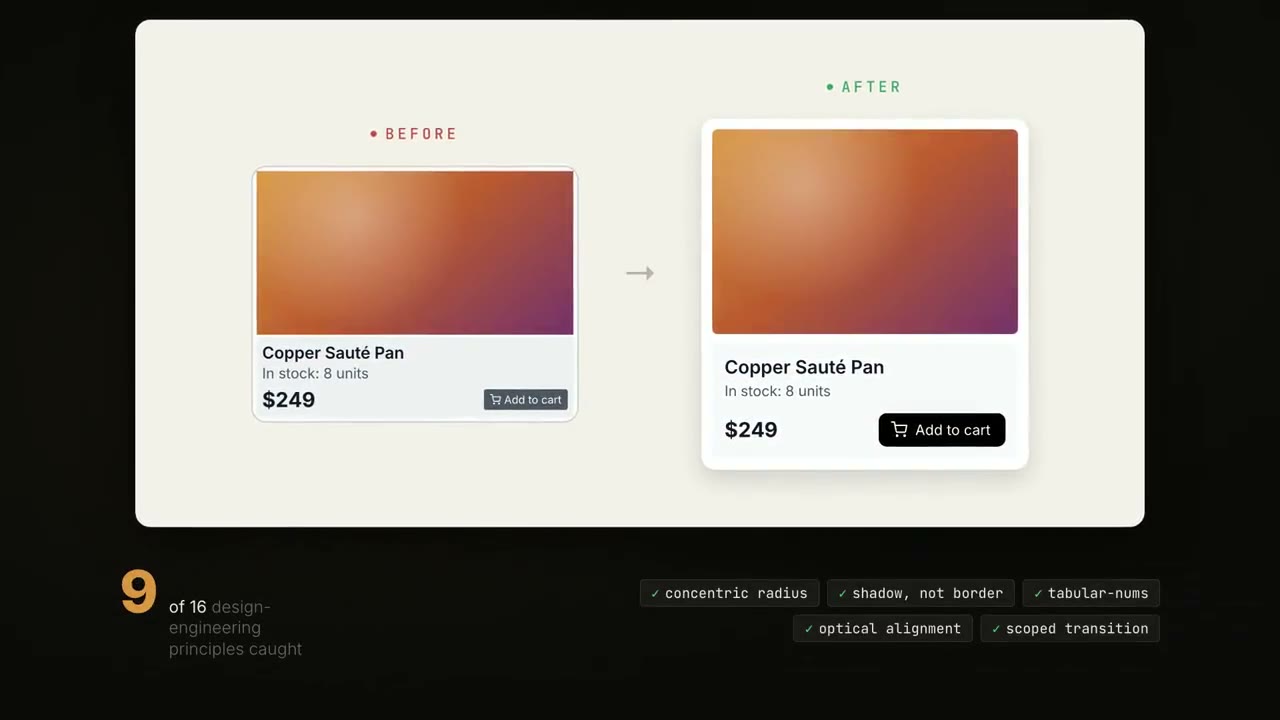
Sixteen design-engineering rules your agent applies to any UI component. They cover the small details that compound into an interface that feels right instead of templated.
The roster
What it does
Make Interfaces Feel Better teaches your coding agent the small design-engineering details that separate a polished interface from a rough one. It is built from Jakub Krehel's article on the subject, turned into rules the agent applies whenever it builds or reviews a UI component.
The details are the ones easy to skip: balanced text wrapping, concentric border radius on nested elements, tabular numbers for values that change, interruptible animations, optical alignment, and shadows instead of hard borders. Install it once and the agent folds them in automatically, or invoke it directly on a component. Works in Claude Code, Codex, and other agents.
When to use it
- Your UI works but feels templated
Sixteen design-engineering rules add the small details that make an interface feel considered.
- Your agent ships generic-looking components
Apply the rules to any component so the polish is consistent instead of one-off.
Common questions
What does Make Interfaces Feel Better cover?
Make Interfaces Feel Better packs sixteen design-engineering rules your agent applies to UI work, covering details like balanced text wrapping, concentric border radius, tabular numbers, and interruptible animations.
How do I use it?
You install Make Interfaces Feel Better with npx skills add jakubkrehel/make-interfaces-feel-better. Your agent then applies the rules automatically when building UI, or you invoke it directly with /make-interfaces-feel-better.
Is it free?
Yes. Make Interfaces Feel Better is a free, open-source agent skill based on the article 'Details that make interfaces feel better,' and it works in Claude Code, Codex, and other agents.